
User-centric personalization
Shape layouts, content and interaction around user preferences. Give your vehicle experience a personal character through supported configuration and connected applications.
Products / TIGRIS SDV Display
Software-defined vehicle display
TIGRIS is a software-defined vehicle (SDV) display platform that brings vehicle information, phone applications, navigation, camera views and ADAS information onto one customizable display. Personalize the experience around your users. Extend it around your services—even after manufacture and field deployment.
01 / Personalization & services
A software-defined display experience shaped around personal preferences and the services you deliver. MAI provides the hardware and software platform, plus app customization for OEMs and business operators.
Shape layouts, content and interaction around user preferences. Give your vehicle experience a personal character through supported configuration and connected applications.
Bring OEM maintenance, dispatch, ride-hailing and delivery applications to the display. Connect the vehicle experience to the services your customers and operations need.
Extend supported layouts, application content and workflows after manufacture and field deployment. Keep the display in service while its connected experience evolves.
02 / Connected sources
Coordinate vehicle electronics, smartphone applications, cameras and external ECUs within your display design.
CAN · configured CAN-FD integration
Embedded Wi-Fi / BLE
Configured video interface
Program-specific interface
TIGRIS
One adaptable display
User preferences · Connected services
03 / Display functions
Combine essential vehicle information with connected functions and your own application content.
Present speed, RPM, battery or fuel status, lighting indicators and vehicle warnings using OEM-defined signals and graphics.
Embedded Wi-Fi and BLE connect compatible phone services, caller information and supported phone interactions.
Display upcoming turns, maneuver distance and route guidance from a connected navigation application.
Present alerts and assistance information supplied by an external ADAS ECU or configured vision subsystem.
Bring connected camera feeds onto the display for rear visibility, maneuvering or application-specific observation.
Present supported messages and application notifications according to OEM display and interaction policies.
04 / Two-wheel & four-wheel applications
Combine vehicle information with OEM and business-owner apps to benefit drivers—and extend the value of your services.
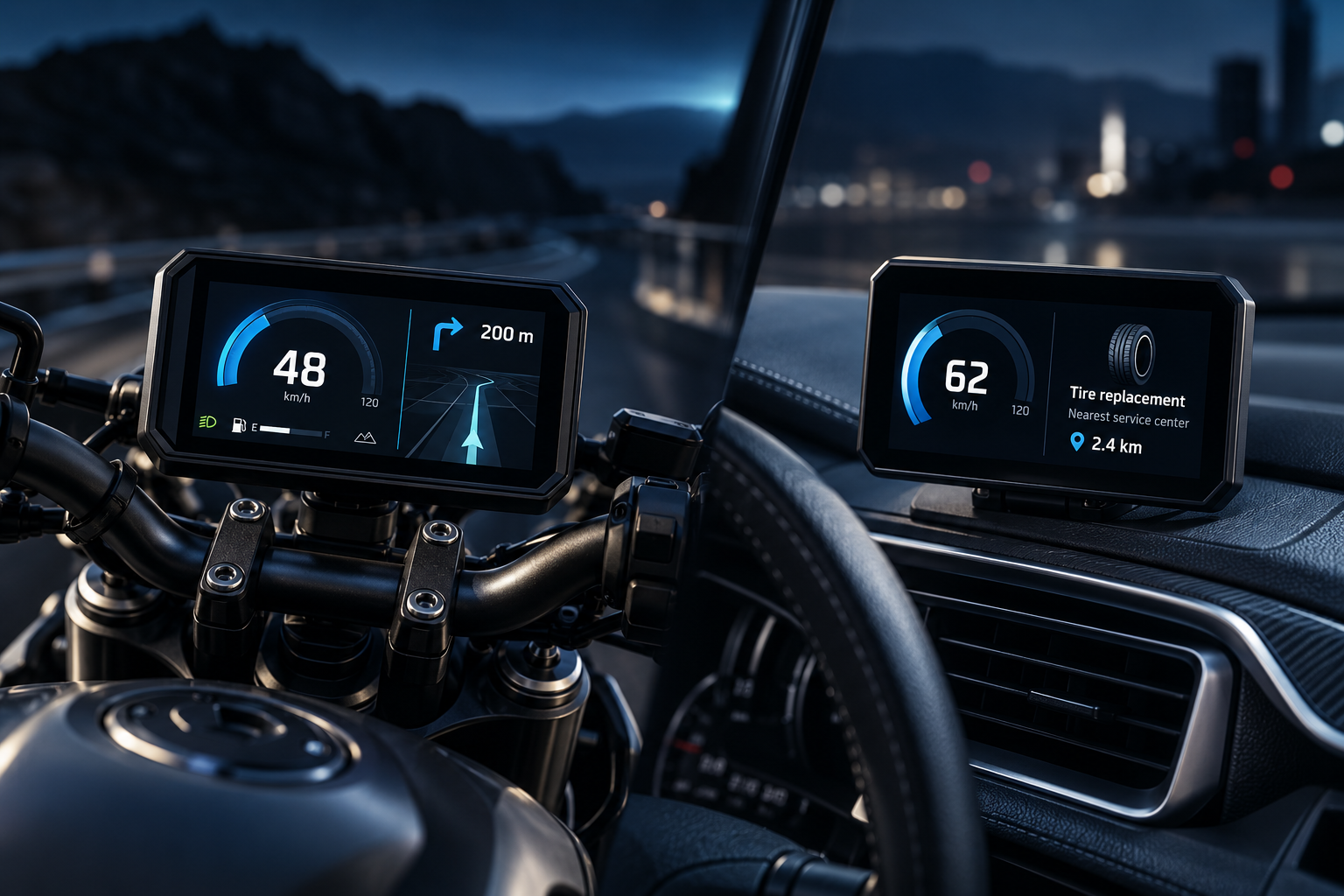
2W / Motorcycles & scooters
For riders: vehicle information and route guidance together, with compatible connected services.
For OEMs: extend branded ownership, maintenance and customer services onto the vehicle display.
For business owners: connect delivery and ride-hailing workflows to assignments, pickup details and navigation.
4W / Passenger & commercial vehicles
For drivers: combine vehicle status with useful maintenance information, such as a tire replacement reminder and the nearest service center.
For OEMs: create a direct channel for service reminders, maintenance guidance and service-network engagement.
For business owners: bring dispatch, job information and field-service workflows onto an application-specific display.
05 / Choose your TIGRIS deliverables
Start with TIGRIS ONE as your SDV display console. Extend the experience with TIGRIS VISION for environmental perception, camera views and recording.
SDV display console
The unified display and interaction endpoint. Coordinate vehicle information, smartphone applications and connected services on a configurable display.
Distributed visual awareness subsystem
A separate vision subsystem that connects environmental perception, live camera views and recorded video to the TIGRIS display experience.
06 / Efficient architecture
Lightweight RTOS execution, smartphone-assisted services and connected vehicle electronics reduce the hardware burden of connected display functions.
Efficient embedded execution.
Compact software architecture.
Supports constrained power and thermal budgets.
4″–10″ display options.
Formats matched to vehicle styling.
Touch and non-touch configurations.
Rating defined for the selected enclosure.
Updates and supported feature extensions.
Together, these features can reduce hardware cost and system complexity compared with implementing equivalent functions on a full Android or Linux display platform.
07 / Specification & integration readiness
TIGRIS ONE display platform summary and configuration options. TIGRIS VISION is a separate Linux-based subsystem; its edge NPU, codec and recording capabilities are described above. Final interfaces, environmental ratings and compliance scope are defined for the selected variant and program.
| Major components | Embedded processor · lightweight RTOS · color TFT-LCD · Wi-Fi / BLE · configured vehicle and video interfaces |
|---|---|
| Display options | 4″–10″ · round or rectangular · touch or non-touch |
| Power supply | 12V / 24V |
| Operating temperature | −40°C to +85°C |
| Vehicle integration | CAN · CAN-FD subject to configuration · OEM signal mapping and external ECU integration |
| Application mirroring | MAI Mirroring SDK for compatible phone, OEM and operator applications |
| Harness & packaging | OEM-specific connectors, harness, mounting and enclosure requirements |
| Environmental protection | IP level defined by product configuration and installation requirements |
| Compliance | EMC, electrical and environmental requirements scoped to variant and target market; program-specific validation |
| Monitoring & fault response | Watchdog and fail-safe / fallback behavior engineered against program functional-safety requirements |
| Software lifecycle | OEM HMI customization · supported updates · configuration and maintenance scope |
Start your program
Tell us your vehicle type, TIGRIS ONE / VISION configuration, content sources, app customization needs, display format and integration requirements. Shape a display that serves your users and evolves with your services.
Discuss Your TIGRIS Program →